




Land it all in the Bronze layer of a medallion Lakehouse — in a way that survives being re-run (idempotent):
- Dimensions — full reload
- Facts — incremental load using watermark
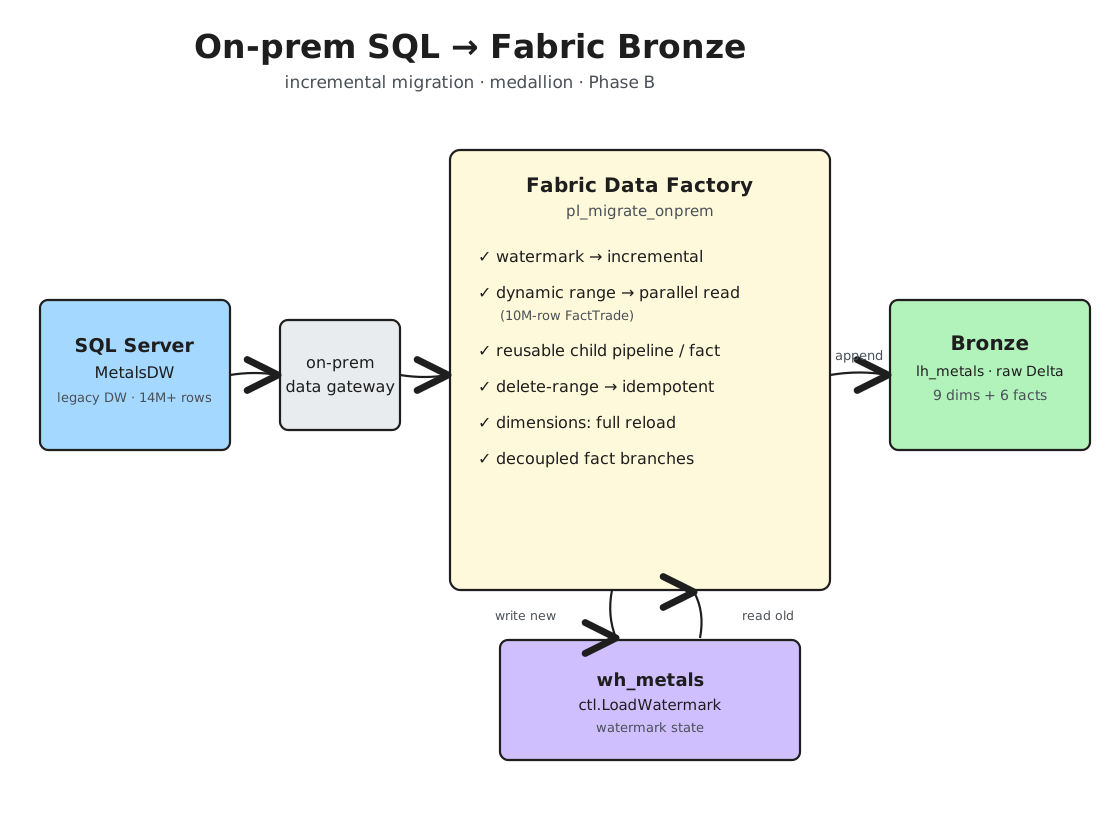
The Architecture
A legacy SQL Server warehouse for a physical metals-trading business (trades, shipments, inventory, LME prices, FX, P&L), an on-premises data gateway, and a Fabric trial.
The Approach
- Dimension tables — full reload via Overwrite. Simple, and always consistent.
- Fact tables — Append only what changed, tracked by a watermark control table in the Fabric Warehouse.
- Decoupled loads — a parent pipeline plus a reusable child pipeline it invokes.
The reason: separation of concerns. A million/billion-row table timing out shouldn’t block the other tables from loading.
The Pipelines
Parent Pipeline
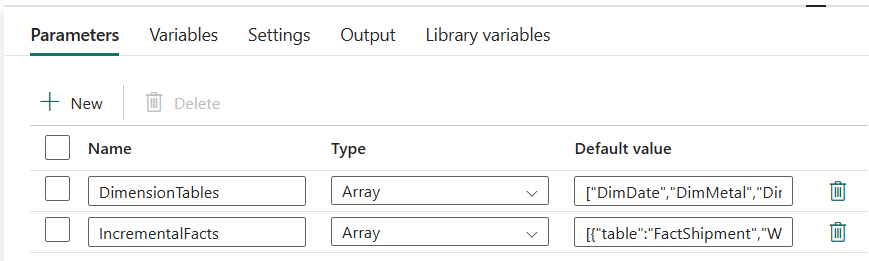
- Starts with two array parameters for dynamic loading of the tables (also makes it easy to add future tables).
- A Script activity to dynamically create the watermark control table if it does not exist.
IF SCHEMA_ID('ctl') IS NULL EXEC('CREATE SCHEMA ctl');
IF OBJECT_ID('ctl.LoadWatermark') IS NULL
CREATE TABLE ctl.LoadWatermark (
    TableName VARCHAR(128) NOT NULL,
    WatermarkValue BIGINT NOT NULL,
    LoadedAtUtc DATETIME2(6) NOT NULL
);
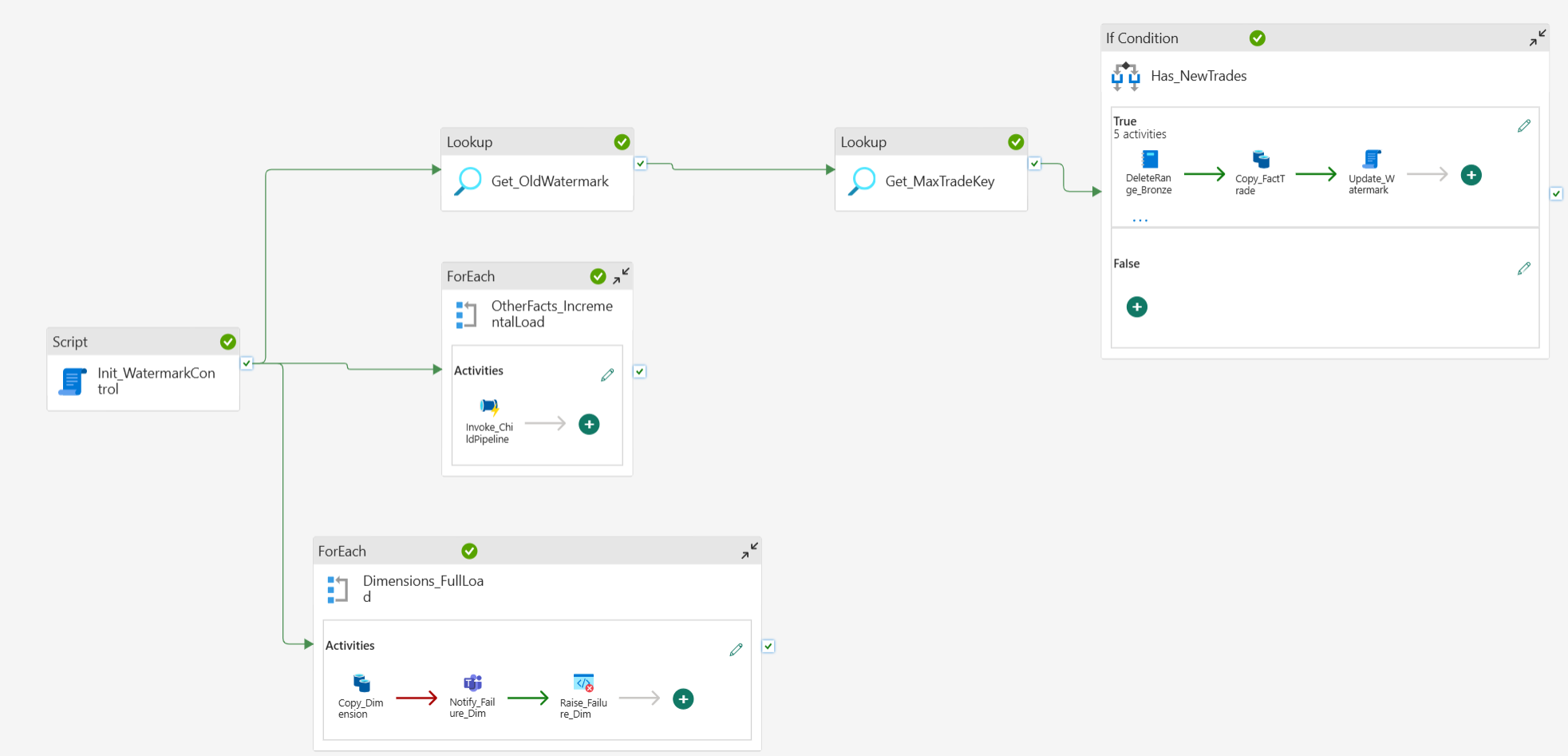
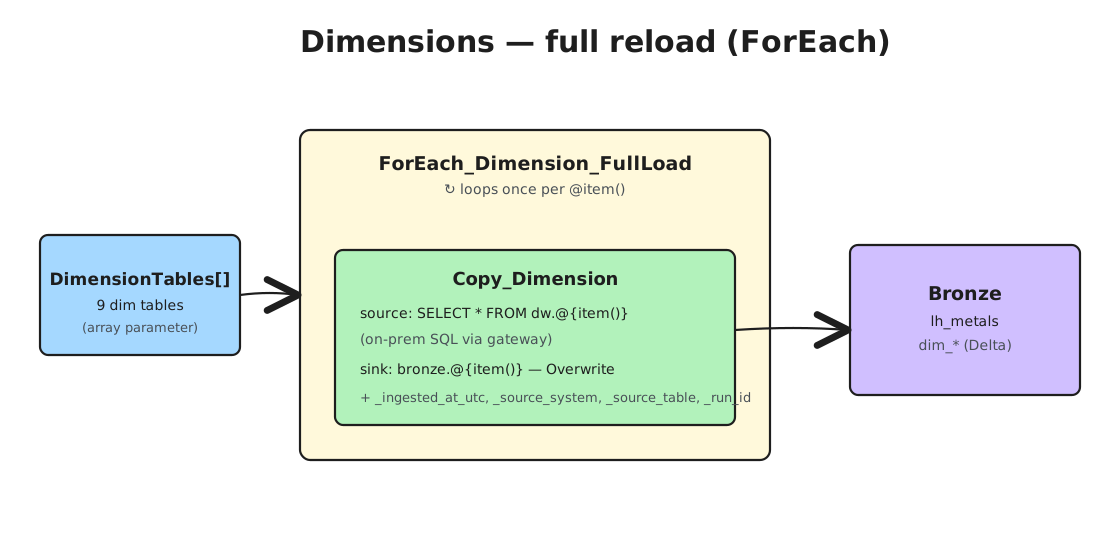
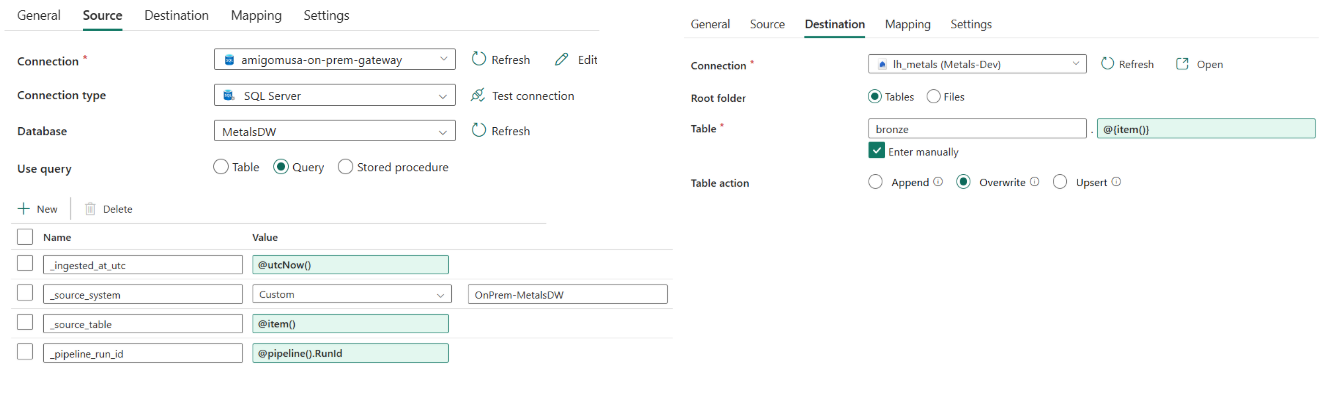
- The dimensions (full reload) — a Copy Data activity inside a ForEach that loops over the
DimensionTablesparameter, dynamically copying each table with additional metadata columns —_ingested_at_utc,_source_system,_source_table,_pipeline_run_id
- The large 10M-row FactTrade table (could be a table of millions of records). It uses the watermark table to do an initial full load and then incrementally append new data. It needs:
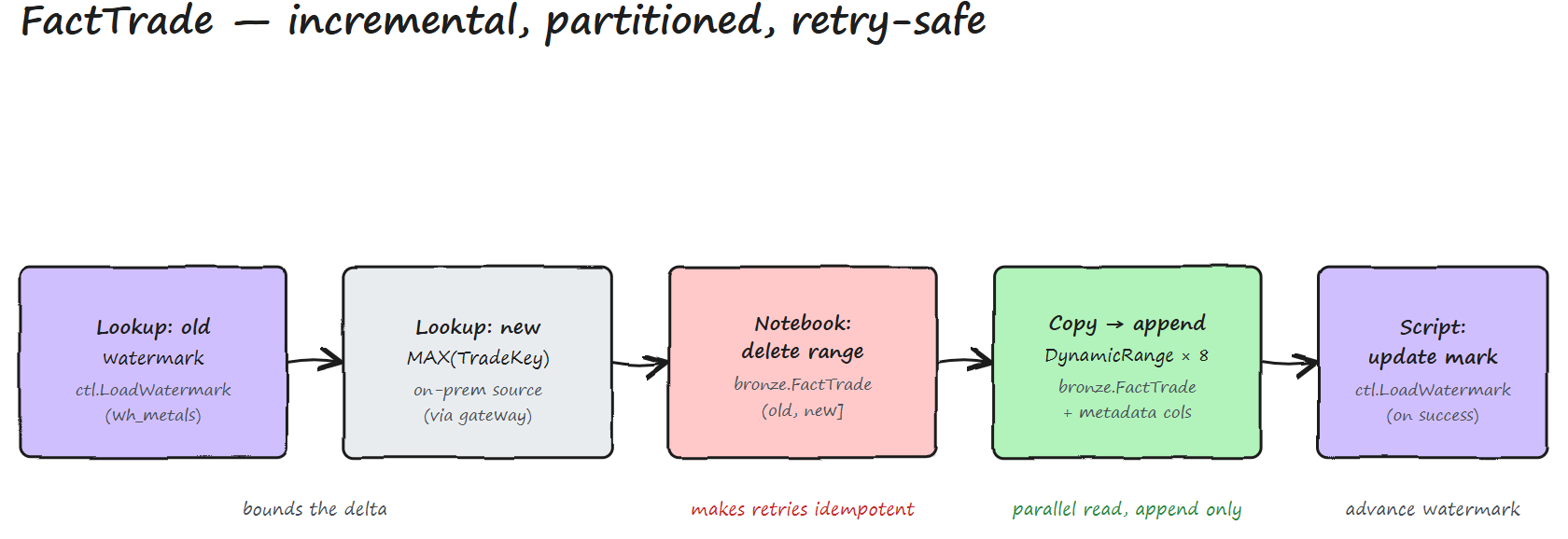
- A Lookup activity against the watermark control table in the Fabric Warehouse to get the old watermark value.
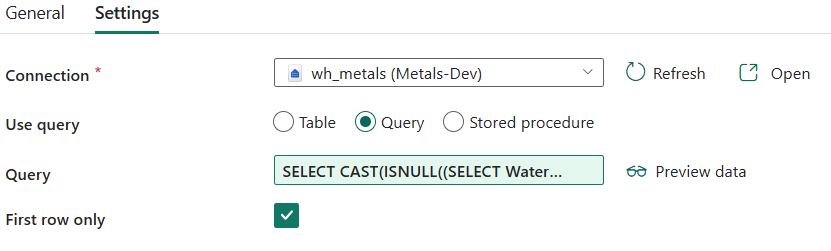
SELECT CAST(ISNULL((SELECT WatermarkValue FROM ctl.LoadWatermark
WHERE TableName='@{variables('varFactTrade')}'), 0) AS BIGINT) AS OldWatermark
- Another Lookup activity against the source on-prem SQL Server to get the new watermark value (usually a date column or an auto-incrementing key).
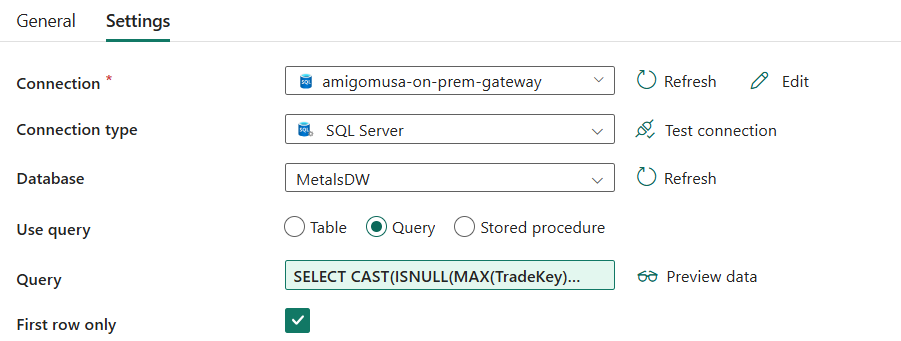
SELECT CAST(ISNULL(MAX(TradeKey), 0) AS BIGINT) AS NewWatermark FROM dw.@{variables('varFactTrade')}
- A Copy Data activity that pulls only the rows between the old and new watermark. If there’s nothing new, the query returns no rows and nothing is appended.
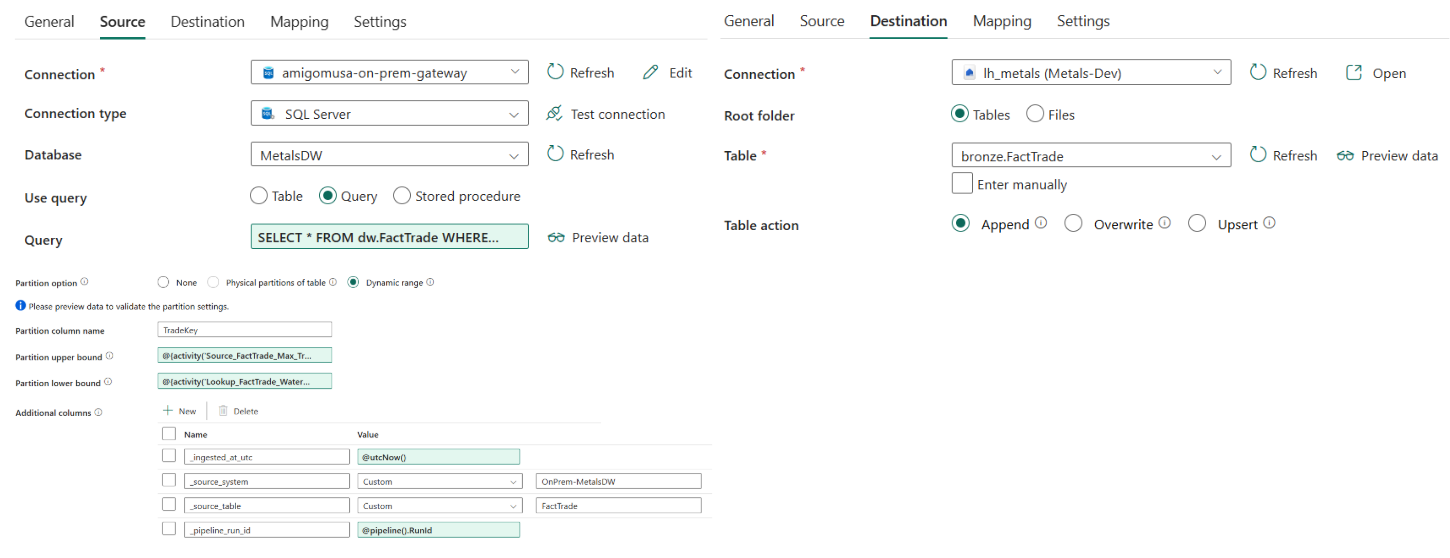
SELECT * FROM dw.@{variables('varFactTrade')} WHERE TradeKey > @{activity('Get_OldWatermark').output.firstRow.OldWatermark} AND TradeKey <= @{activity('Get_MaxTradeKey').output.firstRow.NewWatermark} AND ?DfDynamicRangePartitionCondition
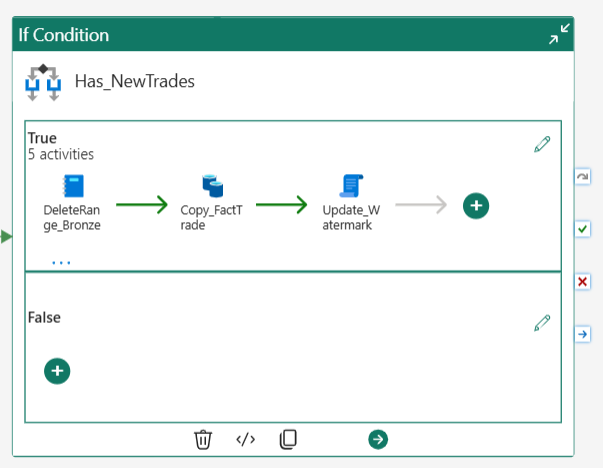
- Retry-safety (idempotency): If a copy fails mid-transfer (for whatever reason), a small Spark notebook deletes the partially-loaded rows first, then re-appends cleanly — no duplicates. The watermark only advances after a fully successful copy.
Note: On a large table, enable dynamic-range partitioning to split the read into parallel slices (instead of one long stream that risks timing out), and set a sensible degree of copy parallelism. You must add the partition condition
?DfDynamicRangePartitionConditionto the query, or the pipeline fails at runtime.
- Finally, a Script activity to update the watermark control table with the latest value, after the copy succeeds.
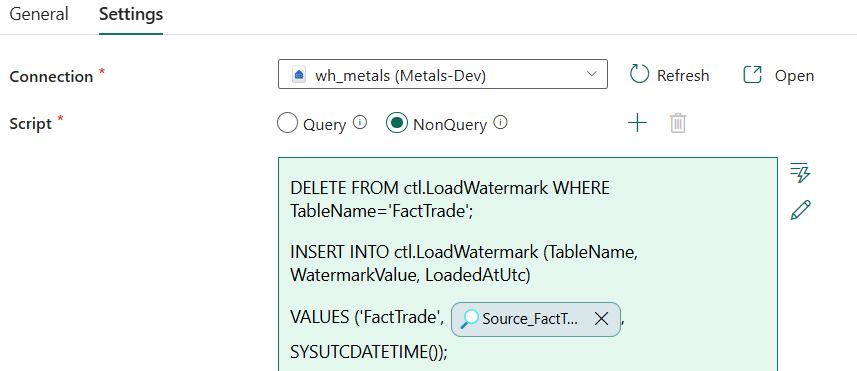
DELETE FROM ctl.LoadWatermark WHERE TableName='@{variables('varFactTrade')}';
INSERT INTO ctl.LoadWatermark (TableName, WatermarkValue, LoadedAtUtc)
VALUES ('@{variables('varFactTrade')}', @{activity('Get_MaxTradeKey').output.firstRow.NewWatermark}, SYSUTCDATETIME());
-
Skip idle runs — the delete → copy → update activities sit inside an If Condition that only fires when the new max key is greater than the stored watermark. A run with nothing new skips the whole branch eliminates unnecessary compute costs, prevents gateway congestion, and completely bypasses Spark cold-start latency when there’s no data to process.
-
On failure — each Copy’s fail path posts to a Teams channel and then triggers a Fail activity, so you’re alerted and the pipeline still reports failure.
The Child Pipeline
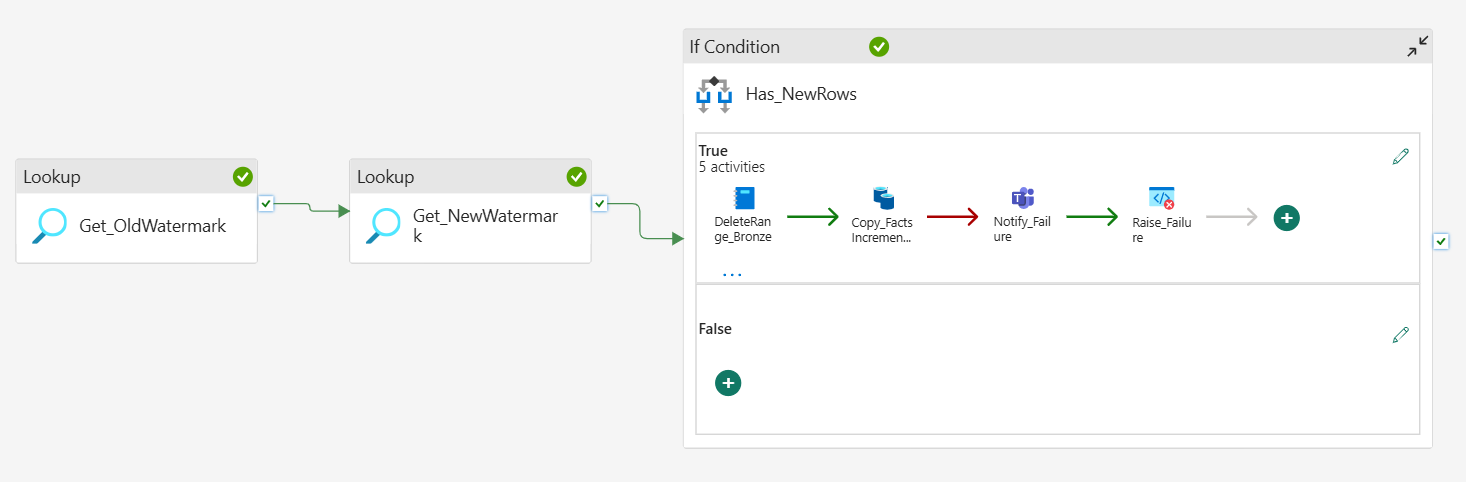
The remaining fact tables all follow the same watermark pattern as FactTrade, so instead of copy-pasting those activities per table, I factored them into one reusable child pipeline, parameterized by TableName and WatermarkColumn.
The parent drives it: a ForEach over the IncrementalFacts parameter runs an Invoke Pipeline activity that calls the child and contains the following activities:
- Lookup — old watermark from
ctl.LoadWatermarkin the Fabric Warehouse. - Lookup — new watermark (
MAX(key)) from the source on-prem SQL Server. - If Condition — Evaluates if new records exist to avoid idle runs.
- Spark Notebook — Clears out partially transferred drift to ensure idempotency
- Copy Data — Appends the clean delta.
- Script — update
ctl.LoadWatermarkwith the new value.
Note: those four activities could have lived directly inside the
OtherFacts_IncrementalLoadloop, but pulling them into a parameterized child pipeline makes each fact independently testable and debuggable — I can run one small table without kicking off the whole the parent.
Alerting on Failure
I added a Teams Notification activity onto the on fail path of each Copy activity — posting to a Teams channel with the failed table, the error message, the watermark bounds, and the run id.
However, to ensure that the pipeline does not treat the failure as a successful run, I added a Failed activity to the notification success node to re-raise the error so the pipeline terminates as failed.
The Gotchas
These failed runs taught me the most:
-
Fabric Warehouse errs when you use standard
DATETIME2datatype when creating a table (“An integer precision value between 0 and 6 must be specified”). It wantsDATETIME2(6) -
Dynamic-range partitioning with a custom query requires the
?DfDynamicRangePartitionConditiontoken in theWHEREclause, or the copy will fail at runtime:
SELECT * FROM dw.@{variables('varFactTrade')} WHERE TradeKey > @{activity('Get_OldWatermark').output.firstRow.OldWatermark} AND TradeKey <= @{activity('Get_MaxTradeKey').output.firstRow.NewWatermark} AND ?DfDynamicRangePartitionCondition
- A failure alert can hide the failure. A Teams activity on a Copy’s fail path that succeeds makes Data Factory mark the pipeline “Succeeded” — add a Fail activity after it to re-raise, or failures go green and silent. (See Alerting on failure above.)
The Results
- The
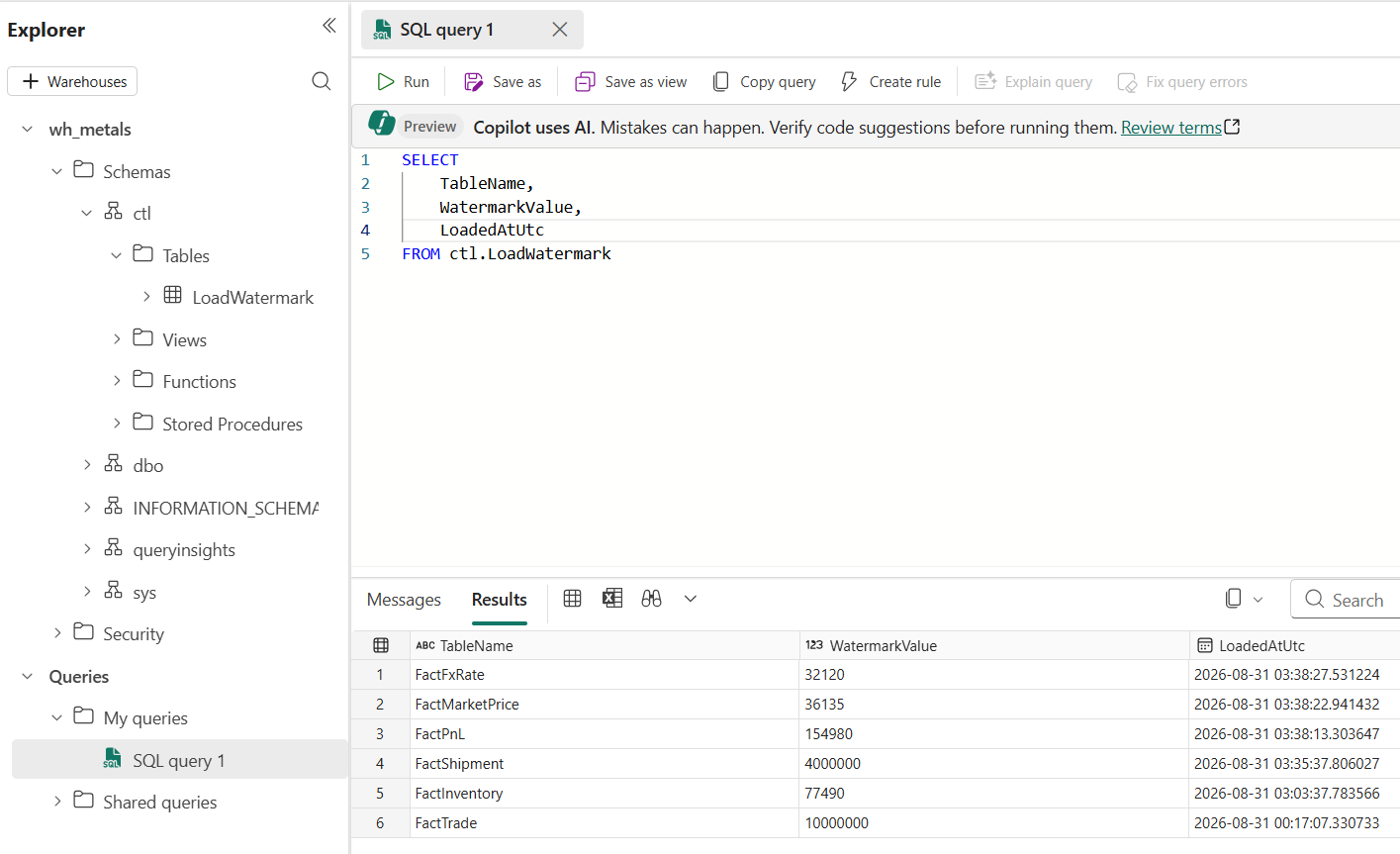
LoadWatermarkcontrol table in the Fabric Warehouse (this Warehouse will host the Gold layer later; for now it just holds the migration’s control state).
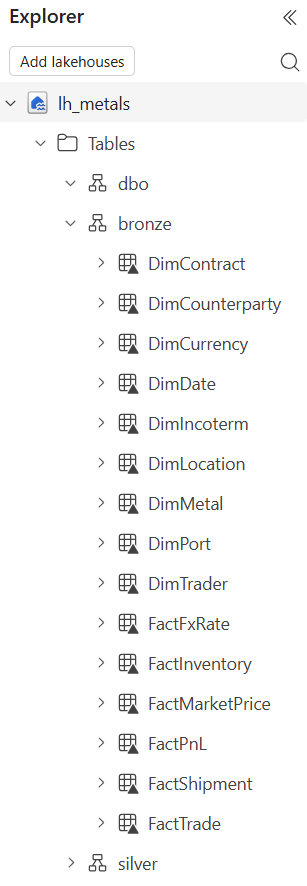
- The Bronze layer holds the 9 dimensions and 6 fact Delta tables copied from the on-prem SQL Server.
Production Notes
Adding notebooks into a pipeline brings two side effects worth planning for:
1. Spark cold-start latency. Lookup and Copy activities run in seconds, but a notebook needs a Spark session. Inside the OtherFacts_IncrementalLoad loop that can mean a fresh session per table.
- Fix: keep the notebooks on the Starter Pool (Fabric’s pre-warmed pool sessions start faster than a custom pool), and in enable high-concurrency for pipeline-running notebooks so the notebook activities share one session across the loop instead of spinning up a new one per iteration.
2. Delta fragmentation from frequent DELETE. Each delete-range leaves small files behind; over time that degrades Bronze read performance.
- Fix: a scheduled (weekly/monthly) maintenance notebook that runs
OPTIMIZE bronze.<table>(compacts + V-Orders small files) andVACUUM bronze.<table>(purges tombstoned files).
The Takeaway
If you’ve done data migrations at scale — how do you handle idempotency on an append sink? Curious whether you’d delete-range like I did.